24/7 Cl0p Ransomware Incident Response Services
Cl0p ransomware incident response 24/7 Emergency Hotline: 1 (833) 562-5273
This page is a defender-focused guide to Cl0p-style ransomware / data extortion response high-level behaviors, realistic timelines, MITRE-mapped patterns, and practical scoping/containment steps. We keep the guidance operational and safe (not “how to hack”). If you’re actively impacted, do not go it alone—containment mistakes can destroy evidence, increase impact, or allow repeat access.
Related Incident Response And Ransomware Resources
This is a curated hub for the pages most commonly used during ransomware response. Deeper links also appear inside sections where they matter.
- Important disclaimer & safe-use notice
- What Cl0p-style “ransomware” response means
- First hour actions (what to do, what not to do)
- Typical Cl0p-style attack chain (defender view)
- High-level TTPs & behavioral patterns (MITRE mapped)
- Redacted but realistic incident timeline examples
- High-signal indicators (behavioral + select technical)
- Initial access themes (file transfer apps & edge exposure)
- Forensics & scoping approach (what we collect)
- Recovery & post-incident hardening
- How the extortion economy works (RaaS, roles, AI)
- FAQ
- 24/7 Cl0p help
Important Disclaimer And Safe-Use Notice
Every environment is different. Response actions can have unintended consequences. Following generalized guidance without qualified support can increase downtime, destroy evidence needed for insurance or legal, or leave persistence in place. If you are actively impacted, we strongly recommend engaging professional incident response.
What Cl0p-Style “Ransomware” Response Means
“Cl0p” is commonly associated with data theft and extortion operations that may include ransomware, but often prioritize exfiltration-first outcomes over widespread encryption. In real-world incident response, the most reliable approach is to focus on intrusion behaviors and repeatable phases, because tooling, infrastructure, and “brand artifacts” change quickly.
Your response goal is to: contain access paths, confirm exposure scope, build a defensible timeline, remove persistence, and recover safely—while preserving evidence for cyber insurance, legal counsel, and regulators.
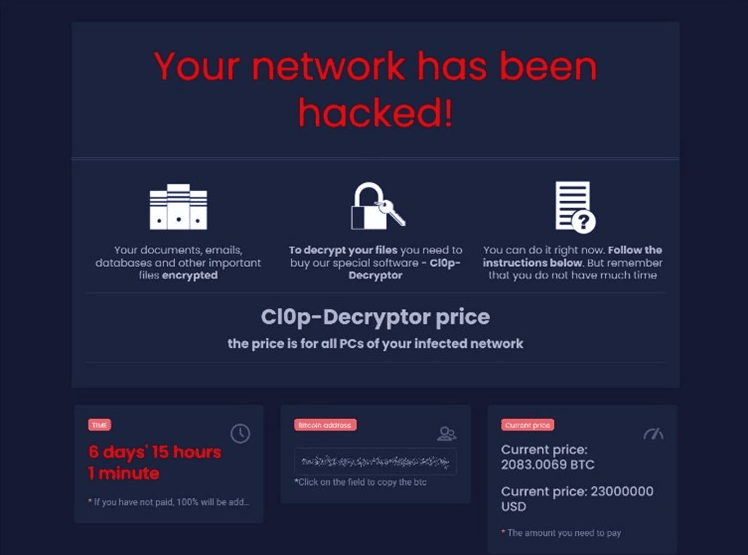
Executive reality: why Cl0p cases hurt
In extortion-first incidents, the key risk is often data exposure, regulatory notifications, contractual reporting, downstream fraud risk, and reputational damage. Even if systems are stable, the organization may still face material impact.
Defender reality: what wins Cl0p cases
Fast evidence preservation (edge + app logs matter), tight scoping of affected systems and data, closure of the initial access path, and a defensible narrative for leadership, insurers, and counsel.
First Hour Actions (What To Do, What Not To Do)
In Cl0p-style incidents, the first hour is about preserving proof and preventing further data loss. The biggest mistake is “breaking the trail” (wiping, patching, or rebooting the only system that has the evidence you need).
What to do (stabilize and preserve)
- Start an incident log: timestamps, actions taken, approvals, and rationale.
- Preserve evidence immediately: edge appliance logs, app logs, file transfer platform logs, and earliest alert timestamps.
- Contain external exposure: isolate affected services (or restrict to known IPs) to stop continued access/exfil.
- Contain identity paths: revoke sessions/tokens for suspected accounts; audit privileged changes.
- Preserve affected systems: snapshot/forensic image before changes; retain relevant log sources before rollover.
What NOT to do (common mistakes)
- Don’t wipe or “rebuild first”: you’ll lose the evidence needed to confirm scope and prove what happened.
- Don’t patch/upgrade blindly on day one: preserve artifacts first; then patch with a controlled plan.
- Don’t assume “no encryption” means “no incident”: extortion-first cases can still be severe.
- Don’t communicate from compromised systems: keep response comms isolated and controlled.
- Don’t over-rotate on IOCs: behaviors + access path validation is the durable signal.
Typical Cl0p-Style Attack Chain (Defender View)
Exact tooling varies by campaign. The sequence below is written at a defender’s operational level—what you can observe, where to look, and how phases connect in exfiltration-first incidents.
Phase 1: Initial access (often app/edge-driven)
Frequently involves exploitation or abuse of exposed services (including file transfer platforms), stolen credentials, or misconfigurations. Defender focus: identify first confirmed access timestamp, exploited surface, and affected tenant/host scope.
Phase 2: Data discovery and collection
Identify what data was reachable: file shares, app repositories, database exports, and “hot” business data. Defender focus: enumerate accessed directories/objects and correlate with authentication sessions.
Phase 3: Staging and exfiltration
Compression bursts, bulk downloads, abnormal outbound transfers, and atypical administrative exports. Defender focus: large egress, repeated downloads, and unusual API usage on the affected application/service.
Phase 4: Extortion and pressure
Threats, deadlines, leak claims, and “proof” samples. Sometimes public posting is used as leverage. Defender focus: validate claims from evidence; manage comms, counsel, and insurer workflows.
Phase 5: Optional impact escalation
Some operations include encryption or disruptive actions, but many cases remain extortion-first. Defender focus: ensure there is no secondary access path that could pivot to encryption.
Phase 6: Remediation and monitoring
Closure of the entry path, validation of exposure scope, notification workflows, and long-term hardening. Defender focus: prevent recurrence and improve detection for similar access patterns.
High-Level TTPs And Behavioral Patterns (MITRE Mapped)
Extortion-first incidents can be “quiet” compared to encryption outbreaks. The best playbooks prioritize behaviors over one-off indicators. Specific tools and IOCs change fast. Behaviors persist.
Initial access and execution
Watch for suspicious access to exposed services, anomalous authentication sequences, and administrative actions outside change windows.
MITRE mapping: Initial Access, Execution
- Unusual access to internet-facing apps (especially file transfer / edge services)
- First-seen IPs / geographies and atypical user-agent patterns
- Admin functions used in bulk (exports, mass downloads, bulk reads)
Persistence and privilege escalation
Persistence may be minimal in “smash-and-grab” campaigns, but privilege shifts and credential reuse still matter.
MITRE mapping: Persistence, Privilege Escalation
- New admin roles, unexpected service accounts, or key/token creation
- Config drift on affected services (new users, new access rules)
- EDR / logging tampering or retention changes (especially on edge systems)
Discovery and collection
Look for directory listing, object enumeration, bulk reads/downloads, and database export activity.
MITRE mapping: Discovery, Collection
- Large numbers of file reads/downloads in short windows
- Repeated access to sensitive folders/records from unusual principals
- Compression/staging bursts on servers that host business data
Exfiltration
Exfiltration is the defining phase. Correlate outbound traffic with application logs and session activity.
MITRE mapping: Exfiltration
- Large outbound transfers to new destinations
- Cloud storage usage that is abnormal for the service/account
- “Download fan-out” patterns (same dataset pulled repeatedly)
Defense evasion
Some campaigns attempt to reduce telemetry: deleting logs, disabling agents, or using short-lived infrastructure.
MITRE mapping: Defense Evasion
- Log clearing / retention reductions on key systems
- Security tooling health drops correlated with suspicious access
- Unexpected changes to monitoring/export configurations
Impact (sometimes optional)
Not every Cl0p-style event ends in encryption. Don’t let the absence of encryption create false confidence.
MITRE mapping: Impact
- Selective encryption or disruptive actions as additional pressure
- Threats of publication and reputational pressure cycles
- Secondary access paths that enable follow-on ransomware
Redacted But Realistic Incident Timeline Examples
These examples are generalized to show how extortion-first events often unfold. The goal is to help defenders recognize the phase and choose safer actions.
Timeline A: “Smash-and-grab” (hours to extortion)
T+00:00 suspicious access to an exposed service / application.
T+00:20 bulk directory listing + high-volume downloads begin.
T+01:10 large outbound transfers observed; log retention risk emerges.
T+06:00 extortion contact initiated; “proof” samples referenced.
Day 1–2 deadline pressure begins; threat of publication escalates.
Defender win condition: preserve logs + confirm exactly what was accessed/exfiltrated.
Timeline B: “Hybrid” (data theft then follow-on impact)
Day 1 initial access; low-noise discovery on data stores.
Day 2 staging + exfil indicators; repeated downloads/exports.
Day 3 identity pivot attempts; new admin activity appears.
Day 4 extortion pressure + threat of publication.
Day 5+ optional escalation (encryption/disruption) if access remains.
Defender win condition: close access paths early so theft doesn’t become an outage.
High-Signal Indicators (Behavioral + Select Technical)
The most durable indicators are behavioral. Technical indicators can help, but they age out quickly. Use the list below to guide triage and hunting.
Application / edge indicators
- Unusual access to file transfer platforms / exposed web services
- Bulk downloads, mass exports, or repeated object enumeration
- First-seen IPs / geos and atypical user-agent strings
- Admin functions used at high volume (export, archive, share, sync)
Identity indicators
- New privileged role assignments or group membership changes
- New MFA enrollment patterns or Conditional Access changes
- Service accounts showing interactive login behavior
- Session/token anomalies (impossible travel, device changes)
Network indicators
- Large outbound transfers correlated with app download/export events
- New destinations not previously seen in your environment
- Repeated transfers of similar-sized archives (staging signature)
- Outbound activity originating directly from edge/app servers
Technical indicators (use carefully)
Technical IOCs are often campaign-specific. If you have extortion emails, portal links, or access logs, we can extract higher-confidence indicators quickly.
- Extortion contact patterns and portal artifacts (do not access from compromised systems)
- Archive naming/placement patterns and staging locations
- Edge/app logs showing exploit attempts or suspicious requests
Initial Access Themes (File Transfer Apps & Edge Exposure)
We intentionally avoid “how to exploit” instructions. For defenders, what matters is where to look and what to harden. Cl0p-style operations have often been associated with high-impact exploitation of internet-facing systems, including third-party file transfer and edge applications.
High-risk entry surfaces to review
- Internet-facing file transfer services and managed file transfer platforms
- Reverse proxies / web gateways and edge appliances
- Externally accessible web apps and admin panels
- Vendor-managed remote access paths and “break glass” accounts
Defender action: how to confirm (without guessing)
- Pull app/edge logs and identify the earliest confirmed suspicious request/session
- Map accessed objects (files/records) to business owners and data classification
- Correlate access events with egress and archive creation indicators
- Patch/harden after evidence preservation, with controlled change tracking
If you suspect an edge/app exploit path, preserve those logs immediately—retention is often short and can be overwritten during remediation.
Forensics And Scoping Approach (What We Collect)
Effective Cl0p incident response requires proof. The objective is to confirm entry points, determine affected systems and datasets, assess exposure risk, and build a defensible timeline.
What we scope first (Cl0p priority order)
- App/edge logs and server artifacts on the exposed service(s)
- Identity events (IdP sign-ins, role changes, session revocations)
- Network egress correlated to download/export/staging events
- Evidence of archive creation / staging and what was included
- Any signs of secondary access paths (VPN/RDP/admin tooling)
What we deliver
- Defensible timeline (who/what/when/where), with supporting artifacts
- Entry point confirmation + containment plan
- Exposure scope assessment (what data was accessed/exfiltrated)
- Evidence set for insurance and legal + prioritized remediation roadmap
For deeper forensics work, see: Digital Forensics and Incident Investigation.
Recovery And Post-Incident Hardening
Recovery in Cl0p-style cases is as much about exposure control and preventing recurrence as it is about system restoration. Your goal is to close the initial access path, validate that exfiltration has stopped, and increase detection for similar behaviors.
Safe recovery steps
- Preserve evidence first (snapshots/images/log exports), then patch/harden with change tracking
- Rotate credentials/keys/tokens associated with affected services
- Validate logging/monitoring on edge systems before declaring closure
- Assess and remediate exposed datasets (legal/regulatory workflow support)
- Hunt for secondary access paths or persistence (don’t assume “single system”)
Hardening priorities
- Reduce internet exposure: IP allowlists, VPN-only admin, segmentation
- Patch cadence focused on edge and third-party apps with strong asset inventory
- Centralize logs into a SIEM with alerts for bulk downloads/exports/egress
- MFA everywhere + phishing-resistant methods for privileged roles
How The Cl0p Extortion Economy Works (RaaS, Roles, And AI)
Extortion operations function like an ecosystem: access acquisition, exploitation, data collection, extortion, and monetization. Whether or not a case includes encryption, the operational goal is leverage.
Common roles you’ll see in extortion ecosystems
- Access brokers: sell footholds (credentials, exposed environments)
- Exploit operators: target edge/app vulnerabilities at scale
- Collectors: identify and stage high-value datasets
- Negotiators: run pressure campaigns and manage communications
- Money movers: convert and launder proceeds
Where AI fits (defender reality)
- Faster target selection: prioritizing exposed apps and likely weak points
- More convincing comms: multilingual extortion and impersonation
- Operational speed: faster parsing of stolen data and victim profiling
- Pressure scaling: automated outreach and reputation amplification
Defender takeaway: attacker velocity increases. Your mitigation is strong asset management, patching, visibility, and practiced incident response.
Cl0p Ransomware / Data Extortion Response FAQ
What if there’s no encryption?
That’s common in extortion-first cases. The critical question becomes: what data was accessed/exfiltrated, and can you prove scope with logs and artifacts. Evidence preservation and scope validation still matter.
Should we pay the extortion demand?
Payment decisions involve legal, insurance, and business risk. Technically, paying does not guarantee deletion of stolen data or prevent reuse. Our role is to help you contain the incident, validate claims with evidence, and support leadership with defensible facts.
What evidence should we preserve first?
Preserve app/edge logs, authentication/session logs, and any download/export records. Preserve egress telemetry, affected server images/snapshots, and any extortion communications (handled from isolated systems).
How fast can you help?
If extortion pressure is active, call the hotline. We can guide evidence preservation and containment immediately while starting scoping and timeline work.
24/7 Cl0p Ransomware Incident Response Help
If you are facing Cl0p-related data extortion, you suspect compromise of an internet-facing file transfer application, or you’re seeing signs of abnormal bulk access and outbound transfer, contact us immediately. The faster we preserve evidence and contain, the more defensible and less costly the outcome tends to be.
If you are still in the “suspicious activity” stage, we can help validate whether you are seeing pre-extortion behaviors and shut down the access path before data loss expands.